Build better Suno prompts
faster, clearer, with less guesswork
Use Suno (usesuno.com) turns scattered prompt experiments into a usable workflow: practical guides, searchable Style references, browser tools, and a Chrome extension that works directly on suno.com.
A workflow you can follow
- Learn how Style, lyrics, structure tags, and model behavior interact.
- Start from searchable Style examples, then test one audible change instead of starting blank.
- Build prompts faster with focused tools, then reuse winners in the extension.
Who this is for
Whether you are learning Suno from scratch or trying to systemize a daily workflow, the site is organized around practical next steps.
New to Suno
Understand how Style, lyrics, structure tags, and prompt wording affect results so your first tracks sound deliberate instead of generic.
Read the How to Use Suno guidePower users
Move faster with 16 browser tools (Prompt Builder, lyrics diff, downloader, profile downloader, tag normalizer, and Lyrics MV Studio) and a searchable Styles library.
Browse all Suno toolsExtension users
Suno Prompt Manager opens on suno.com so you can save, search, and apply Style prompts without leaving the generation flow.
See the extensionSuno browser tools
Sixteen utilities with no usesuno account required. Text and prompt tools process your input locally; link-based tools fetch public Suno pages or assets over the network. Lyrics MV Studio turns local audio and timed lyrics into an animated lyric video in your browser.
Prompt Builder
Stack a Style string from five pillars; genre, instruments, mood, vocal, production.
Style string cleaner
Dedupe tags, trim spaces, drop hype words and fit a character budget.
Exclude styles generator
Select unwanted sounds and copy a clean list for Suno's Exclude control.
Random style generator
Roll a full Style idea across five pillars; lock what you like, re-roll the rest.
Lyrics text diff
Compare original and revised lyrics side by side with per-line counts and diff.
Structure tag helper
Insert [Verse], [Chorus] and [Bridge] tags and flag tags Suno may not know.
Lyrics tag normalizer
Convert CJK, Spanish, French and other section tags into standard [Verse], [Chorus].
Lyrics timestamp
Time lyrics to your audio and export LRC, SRT, VTT or synced lyrics embedded in MP3.
Lyrics MV Studio
Turn local audio and timed lyrics into an animated lyric MV in your browser, then export the finished video.
Duration estimator
Estimate how long lyrics will sing by pace, with per-section breakdown.
Suno downloader
Download a Suno song as available audio, video or cover art on your device.
Suno playlist downloader
Paste a Suno playlist link to download every song as MP3, or save the whole playlist as a ZIP.
Suno profile downloader and analyzer
Analyze a public creator's songs, duration and styles, then save available MP3s or a ZIP.
Cover art downloader
Grab a song's cover art and download a clean square at the size you need.
Suno song inspector
Retrieve title, creator, style tags, duration and available lyrics from a public Suno link.
Batch link parser
Parse many Suno links into one table and export metadata as CSV or JSON.
Everything you need to go from random results to repeatable output
Use the guide to learn, the library to choose a starting point, the tools to build a controlled revision, and the extension to keep what you tested.
Guide hub
Start with a first-song workflow, learn controlled prompting, then open the playbook or troubleshooting page for the variable you need to change.
Style prompts
Searchable Style examples you can copy fast, remix, and use as a starting point for your own prompt stack.
Tools hub
Prompt Builder, lyrics diff, downloader, tag normalizer, Lyrics MV Studio, and eleven more; filter by keyword on one page.
Suno feature overview
Quick unofficial overview of voices, custom models, personas, stems, ReMi, and other workflow features; confirm details on suno.com.
The Suno Creator Field Guide
Eight focused walkthroughs for the decisions that usually slow a song down: prompts, lyrics, vocals, genre blends, arrangement, production, and troubleshooting.
A Practical Suno Prompt Workflow for Better Songs
Turn an open-ended idea into a controlled musical brief, then revise the audible result instead of rebuilding the whole prompt after every generation.
How to Write Suno Lyrics That Fit Song Structure
Shape lyric sections around musical jobs, vocal breathing room, and intentional repetition so the song has somewhere to go.
Suno Vocal Prompts: A Clear Direction Framework
Describe the voice through delivery, range, phrasing, texture, and distance without relying on celebrity imitation.
How to Blend Genres in Suno Without Muddy Results
Create intentional hybrids by choosing a primary musical grammar and borrowing only the secondary traits that serve the song.
Suno Arrangement Prompts for Clearer Roles
Move beyond instrument lists by describing who carries rhythm, harmony, melody, texture, and transitions in each section.
A Repeatable Suno Prompt Testing Plan for Creators
Replace random rerolls with a lightweight comparison method that records the prompt, the audible change, and the next decision.
Suno Production Words for Space, Width, and Tone
Translate vague requests for a “professional sound” into room, width, density, dynamics, texture, and distance you can compare.
How to Troubleshoot Weak Suno Song Results
Diagnose the audible symptom, identify the most likely prompt category, and change the smallest thing that could improve the song.
Suno Prompt Manager
The extension keeps your best Style prompts beside the field where you generate.
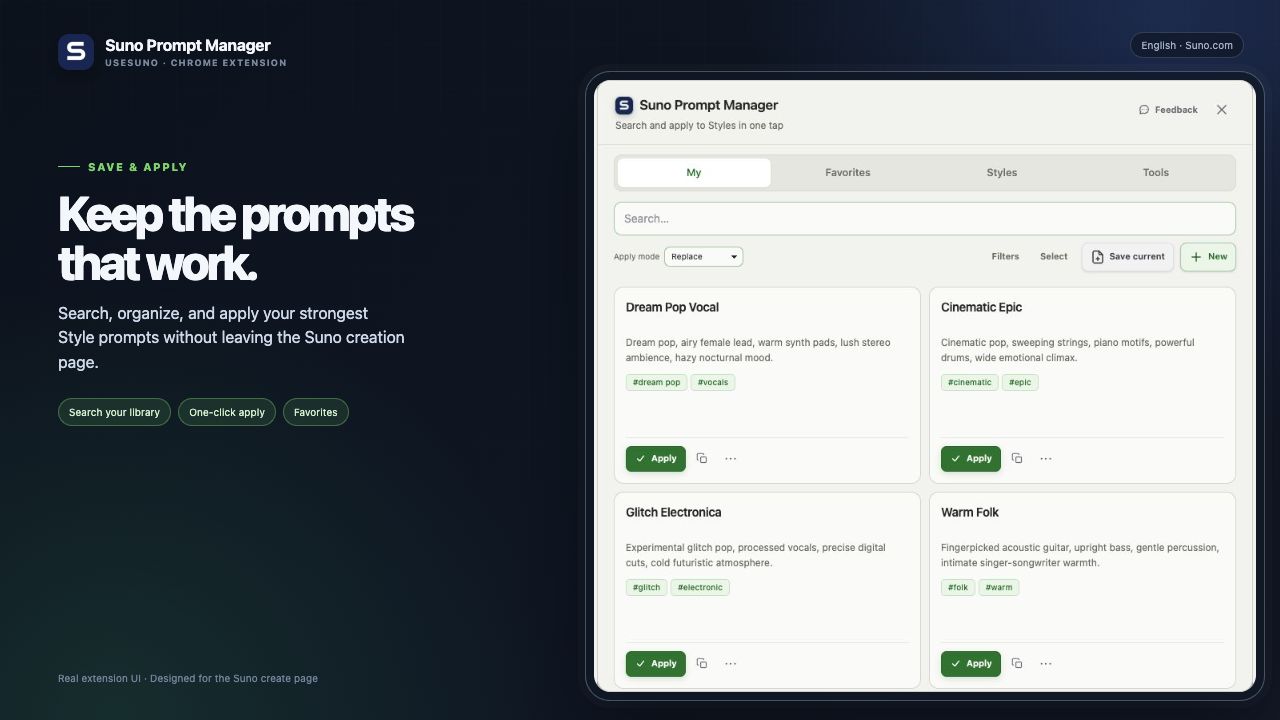
Chrome extension for suno.com. Independent tool, not affiliated with Suno.
Why creators install it
- Apply saved Style prompts directly on the creation page instead of copying from notes.
- Search, sort, and organize your strongest prompt lines as your library grows.
- Stay local-first by default, with optional sync when you want the same setup across devices.